

Transformamos #InteligenciaArtificial en oportunidades. Aprende, crea y monetiza con IA. Cursos y tips para innovadores digitales. Únete al movimiento IntelArt
Revisa Columna DESTACADOS 👇
- Tweets 80,063
- Following 1,943
- Followers 36,230
- Likes 51,656


Pinned Tweet

Después de muchas recomendaciones, el mes pasado terminé de leer el libro Hábitos Atómicos de James Clear.
Así que hoy te compartiré 6 indicaciones para ChatGPT basados en este libro.
Cada pequeño hábito acerca al éxito.
Guarda o te Arrepentirás.
🧵

41
833
3,592
565,855
IntelArt - Innovación IA retweeted
El 90% compra 1 Teléfono Android y solo utiliza 20% de sus funciones.
No necesitas instalar aplicaciones de 3ros para sacarle el máximo partido a tu Celular.
Aquí tienes 15 TRUCOS poderosos que casi nadie conoce, que te cambiarán la forma de usar tu Celular.
👇⬇️👇⬇️👇⬇️
1. Usa el modo de una sola mano.
Los teléfonos son cada vez más grandes, pero Android incluye un modo que reduce el tamaño de la pantalla para facilitar el uso con una sola mano.
•Ideal para móviles de más de 6 pulgadas.
•Se activa desde los ajustes de gestos (según el fabricante).
2. Comparte la contraseña del WiFi con un código QR.
Ya no necesitas decir tu contraseña letra por letra.
•Ve a Ajustes → WiFi.
•Selecciona tu red.
•Pulsa Compartir.
•Se generará un código QR para que otra persona se conecte al instante.
3. Divide la pantalla para usar dos aplicaciones al mismo tiempo.
Android permite ejecutar dos aplicaciones simultáneamente.
•Ver YouTube mientras respondes mensajes.
•Tomar notas durante una videollamada.
•Comparar documentos fácilmente.
4. Activa historial de notificaciones.
¿Borraste una notificación sin querer?
Android guarda 1 historial para que puedas volver a verla.
•Ajustes.
•Notificaciones.
•Historial de notificaciones.
5. Fija 1 aplicación en pantalla.
Si prestas tu teléfono a otra persona, puedes bloquear el acceso a una sola aplicación.
•Ideal para niños.
•Perfecto cuando alguien solo necesita usar una app específica.
6. Activa los subtítulos automáticos.
Dispositivos Android incluyen subtítulos automáticos para cualquier contenido multimedia.
•Videos.
•Podcasts.
•Llamadas compatibles.
•Redes sociales.
7. Utiliza Google Lens desde la cámara.
Google Lens puede hacer mucho más que traducir textos.
•Resolver ejercicios.
•Copiar texto desde papel.
•Identificar plantas.
•Reconocer monumentos.
•Buscar productos similares.
8. Programa el modo No Molestar.
Evita interrupciones durante la noche o en reuniones importantes.
•Programa horarios automáticos.
•Permite llamadas de emergencia.
•Silencia aplicaciones específicas.
9. Usa ahorro de batería inteligente.
Android aprende tus hábitos para optimizar el consumo energético.
•Reduce el uso en 2do plano.
•Prioriza las aplicaciones más utilizadas.
•Mejora la duración de la batería.
10. Activa el desbloqueo inteligente (Smart Lock).
Tu teléfono puede permanecer desbloqueado en lugares seguros.
•En casa.
•Con dispositivos Bluetooth confiables.
•Mientras lo llevas contigo.
11. Accede al menú oculto para desarrolladores.
Este menú incluye funciones avanzadas para personalizar el sistema.
•Reduce la velocidad de las animaciones.
•Visualiza información técnica.
•Mejora la sensación de rapidez del dispositivo.
Para activarlo:
1.Ve a Ajustes.
2.Información del teléfono.
3.Pulsa siete veces sobre: "Número de compilación".
12. Usa el teléfono como escáner.
Con Google Drive o Google Files puedes escanear documentos sin instalar aplicaciones adicionales.
•Convierte documentos en PDF.
•Recorta automáticamente.
•Mejora la calidad del texto.
13. Copia texto desde imágenes.
Gracias a Google Lens puedes seleccionar texto directamente desde una fotografía.
•Contraseñas.
•Documentos.
•Libros.
•Carteles.
14. Encuentra tu teléfono aunque esté en silencio.
Con la función "Encontrar mi dispositivo" puedes localizar tu móvil, hacerlo sonar, bloquearlo o borrar su contenido de forma remota.
15. Activa la protección contra robo.
Las versiones más recientes de Android incluyen funciones que ayudan a proteger tu información si el teléfono es robado.
•Bloqueo automático tras detectar un robo.
•Protección de datos personales.
•Mayor seguridad para tus cuentas.

ALT Infografía con fondo claro e iconos de colores que enumera 15 funciones útiles de Android: modo de una sola mano, compartir WiFi con QR, pantalla dividida, historial de notificaciones, fijar aplicación, subtítulos automáticos, Google Lens, programa no molestar, ahorro de batería inteligente, desbloqueo inteligente, menú de desarrollador, escáner de documentos, copiar texto de imágenes, encuentra tu teléfono y protección contra robo.
4
8
8
681
IntelArt - Innovación IA retweeted

BREAKING🚨: These 15 careers will quietly dominate the next 10 years.
Most people won’t notice until it’s too late.
The people learning these skills today will be impossible to ignore by 2030:
27
45
53
2,199
IntelArt - Innovación IA retweeted

You can earn $8000/month if you have ChatGPT, a laptop, an internet connection, and 60 mins a day
Usually, I'd charge $83 for this guide, but today I'm giving it away totally free.
Like + reply 'Money' & I'll send you my exclusive guide for FREE.
Must follow me to get guide in DM.
Free for 48 hours only.

11
19
25
452
IntelArt - Innovación IA retweeted

This started as a character sheet.
Not a filmed actor. Not footage I edited afterward.
I gave Wan 3.0 a character reference and tried to see if I could turn it into something that actually felt like a scene from a movie.
This is what came out of Magnific.
be.magnific.com/4wPeipA

18
79
181
88,088
IntelArt - Innovación IA retweeted
¿Unes Nombres y Apellidos a mano en Excel o copias-pegas celda x celda? Deja de perder horas.
Truco de Excel que todo Oficinista Inteligente debe saber: Con el operador de CONCATENACIÓN.
Plantilla Lista:
=[@Nombre] & " " & [@Apellido]
O en Celdas Normales:
=A2 & " " & B2
👇⬇️

1
8
13
1,062
IntelArt - Innovación IA retweeted

¿Te sientes PERDIDO en la VIDA?
Reconstrúyete en los próximos 6 meses 💪
HILO 🧵

16
43
99
5,993
IntelArt - Innovación IA retweeted
You can earn $9,000 per month if you have ChatGPT, a laptop, and 60 mins a day.
Usually, I'd charge $97 for this proven guide, but today it's yours 100% FREE.
Like + reply 'Money' & I'll send you my complete guide for FREE.
Must follow me @Tips_With_AI to get DM.
FREE for 48 hrs only.

45
30
45
1,298
IntelArt - Innovación IA retweeted
48 websites that can turn a “Quick Visit” into hours of exploring 🌍
1. zoom.earth — Live satellite views
2. flightradar24.com — Track planes worldwide
3. marinetraffic.com — Track ships in real time
4. windy.com — Live weather & storms
5. lightningmaps.org — Live lightning strikes
6. earthquake.usgs.gov — Recent earthquakes
7. submarinecablemap.com Explore internet cables
8. globalforestwatch.org — Monitor global forests
9. worldometers.info — Live world statistics
10. internetlivestats.com — Live internet stats
11. thetruesize.com — Compare country sizes
12. oldmapsonline.org — Explore historical maps
13. davidrumsey.com — Historical map archive
14. openstreetmap.org — Community-built world map
15. window-swap.com — Windows around the world
16. virtualvacation.us — Virtual city walks
17. mapcrunch.com — Random places worldwide
18. atlasobscura.com — Strange places worldwide
19. neal.fun — Fun interactive experiments
20. htwins.net/scale2 — Atom to universe
21. eyes.nasa.gov — Explore space in 3D
22. stellarium-web.org — Interactive sky map
23. apod.nasa.gov — NASA’s daily space image
24. images.nasa.gov — NASA image archive
25. pudding.cool — Interactive data stories
26. ourworldindata.org — Global data & insights
27. gapminder.org — Understand global trends
28. informationisbeautiful.net — Data visualizations
29. data.worldbank.org — World Bank data
30. data.tuik.gov.tr — Turkey’s official statistics
31. archive.org — Massive digital archive
32. gutenberg.org — Free classic books
33. openlibrary.org — Explore millions of books
34. loc.gov — Library of Congress archive
35. europeana.eu — Europe’s cultural archive
36. dp.la — America’s digital library
37. artsandculture.google.com — Virtual museums
38. rijksmuseum.nl High-res artworks
39. wikiart.org — Online art collection
40. publicdomainreview.org — Historical treasures
41. openculture.com — Free culture & education
42. metmuseum.org — Explore the Met collection
43. musicmap.info — Explore music genres
44. radiooooo.com — Music by country & decade
45. listen.hatnote.com — Wikipedia edits as audio
46. arxiv.org — Free research papers
47. timeanddate.com — Time & astronomy tools
48. sciencedaily.com — Latest science news
Save this. You’ll definitely need some of these later. 🔖
Follow @NextGenAi5 for more useful websites, AI tools & tech resources.

40
86
127
5,945
IntelArt - Innovación IA retweeted
Chrome incorporó lo que la comunidad pedía hace años: PESTAÑAS VERTICALES.
TRUCO:
1 Clic derecho en 1 espacio vacío de la barra de pestañas superior o en 1 abierta.
2 Menú desplegable, opción: Mostrar Pestañas Verticalmente.
3 Tus pestañas se moverán al lado izquierdo.
CLIC 👇

4
7
10
1,299
IntelArt - Innovación IA retweeted
How does AI actually work? 🤖
AI might look like magic, but behind every answer, image, recommendation, and prediction is a combination of data, algorithms, mathematics, and computing power.
At a high level, AI models learn patterns from huge amounts of data during training. When you give the model a prompt, it uses those learned patterns and the context of your input to generate an output.
From chatbots and AI image generators to autonomous agents and recommendation systems, AI is already changing how we work, create, and solve problems.
AI isn’t magic. It’s data + algorithms + computation working together. ⚡
If you found this useful:
❤️ Like
🔁 Repost
💬 Share your thoughts
➕ Follow for more AI & tech content

34
56
78
2,350
IntelArt - Innovación IA retweeted
El 90% de las personas siguen haciendo Portadas y Títulos aburridos en Word.
No necesitas Canva ni Photoshop para darle un toque profesional y creativo a tus documentos.
Mira cómo rellenar cualquier texto con una imagen, usando un Truco sencillo dentro de Microsoft Word 👇🏼

3
25
62
3,181
IntelArt - Innovación IA retweeted
Pasar de hacer Consultas a crear Sistemas de IA, esta es la Hoja Visual que necesitas entender.
Cada capa añade 1 grado de control superior:
🗣️Mensaje ➡️ 🧠Memoria ➡️
⚙️Maquinaria ➡️🔄Sistema Autónomo
Infografía para entender diferencia entre la entrada de 1 prompt y 1 bucle👇

6
19
45
1,959
IntelArt - Innovación IA retweeted
Novedad en Gemini Notebook
Resúmenes de Aprendizaje Interactivos ahora en Versión GRATUITA.
¿Qué hace?
NO entrega texto largo/tedioso, combina resumen de tus fuentes con mapas mentales, guías y cuestionarios en 1 pantalla interactiva.
Puse Voz/Subtítulos español para ti
CLIC👇

5
8
11
1,377
IntelArt - Innovación IA retweeted
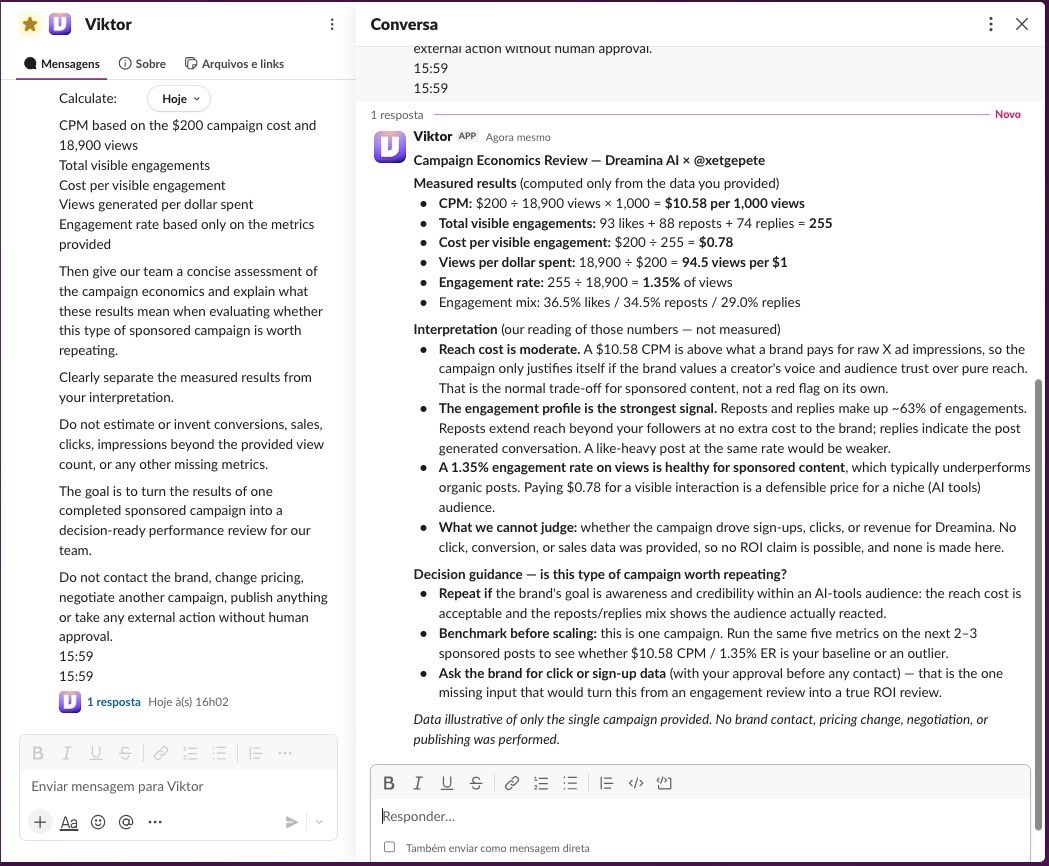
$200 generated 18,900 views and 255 visible engagements on one sponsored campaign.
Our team runs paid AI campaigns on X, and one problem we had was deciding whether a campaign was actually worth repeating once it was over.
We used to look at views and engagement manually, but that didn’t give us a consistent way to evaluate what we actually paid for.
So we gave Viktor the real results from our latest Dreamina campaign.
He broke the $200 spend down to a $10.58 CPM, $0.78 per visible engagement and 94.5 views for every dollar spent.
More importantly, he separated what the data proved from what it couldn’t. No claims about sales or conversions without the data.
Viktor handles the analysis. Our team still makes the decision.
Most teams don’t need more campaign data. They need someone to turn the data they already have into a decision.
Most AI tells you what to do. Viktor does it.
Hire @viktor_com for your team. $100 in credits included, no card. Full link in first comment.
#AIemployee #CreatorMarketing
Paid Partnership
15
36
122
59,557
IntelArt - Innovación IA retweeted
I'm going to quit my job to dedicate myself 100% to Claude.
I asked it to do this 👇
Analyze undervalued markets on Polymarket to find arbitrage opportunities and detect the wallets that are taking advantage of them so I can copy them.
I turned $2K into $10.5K overnight.
It monitored +489 wallets.
I realized something very quickly.
There are arbitrage bots against which I can't compete without knowing how to program.
But I can find them. And copy them.
Claude built me a monitoring terminal connected to a copytrading bot on Telegram.
It's not a script. Not even a bot.
It's an AI agent that improves every time it finds a new wallet.
It analyzes the behavior of each wallet. How it operates. Its arbitrage patterns. The size of its positions. The exact moment it enters.
• 75% hit rate.
• 7 wallets being copied right now out of more than 500 monitored.
The bot never stops. Never bets. It just follows the math and seeks profit.
You only need:
• Claude
• A Mobile/Laptop/Computer
• 2 hour a day
I'm going to share it for free for the next 24 hours.
To get it 👇
1. Follow @NextGenAi5
2. Comment “ Claude ”
3. Like and RT

84
87
120
6,054
IntelArt - Innovación IA retweeted
This is what the future of video creation looks like: create, point, prompt, done.

Creating marketing videos is a solved problem.
Honestly, I can't imagine another creative area where we save so much time and money.
Generating something like this used to cost thousands of dollars and take weeks.
Now, it's cents and minutes.
Best part of this: their mark-to-fix feature, where you can mark anywhere in the video and change it with a prompt.

14
10
23
2,548
Esta web IA permite Aislar, Eliminar, Ajustar o Mezclar la Voz, Batería, Guitarra o Bajo de 1 canción en Seg.
Sube: Cualquier formato de audio, hasta 200 MB y 20 min.
La IA aísla: Modelos de 6/4 stems para separar.
Ajusta: Volumen, Voz, Tempo o Mezclas propias y descarga.
CLIC

5
5
11
1,153
