devtoolstips.org just got a face lift! Now with: ✅ A home page that actually says what the site is about 
✅ A persistent sidebar to quickly access collections of tips.
✅ A persistent search field to find other tips.
7
31
2,869
📏 The current size of the viewport is kind of important to know about when debugging certain issues, or working on media queries. 💡With DevTools, you can easily see the viewport size! devtoolstips.org/tips/en/see…
1
334
🚨 New useful tip on the site! Highlight all elements that match a given CSS selector. 🔗 devtoolstips.org/tips/en/hig…
1
6
13
4,955
Concerned about your privacy on the web? You can use DevTools to check if the website you're visiting uses third-party cookies 🍪🥠 ➡️ devtoolstips.org/tips/en/det…
2
3
607
💡 You can customize the way objects are displayed in the Console and when debugging JavaScript in DevTools! Even better, this now also works in Firefox, in addition to Chrome and Edge. Learn all about creating your own custom object formatters at devtoolstips.org/tips/en/cus…
8
16
3,765
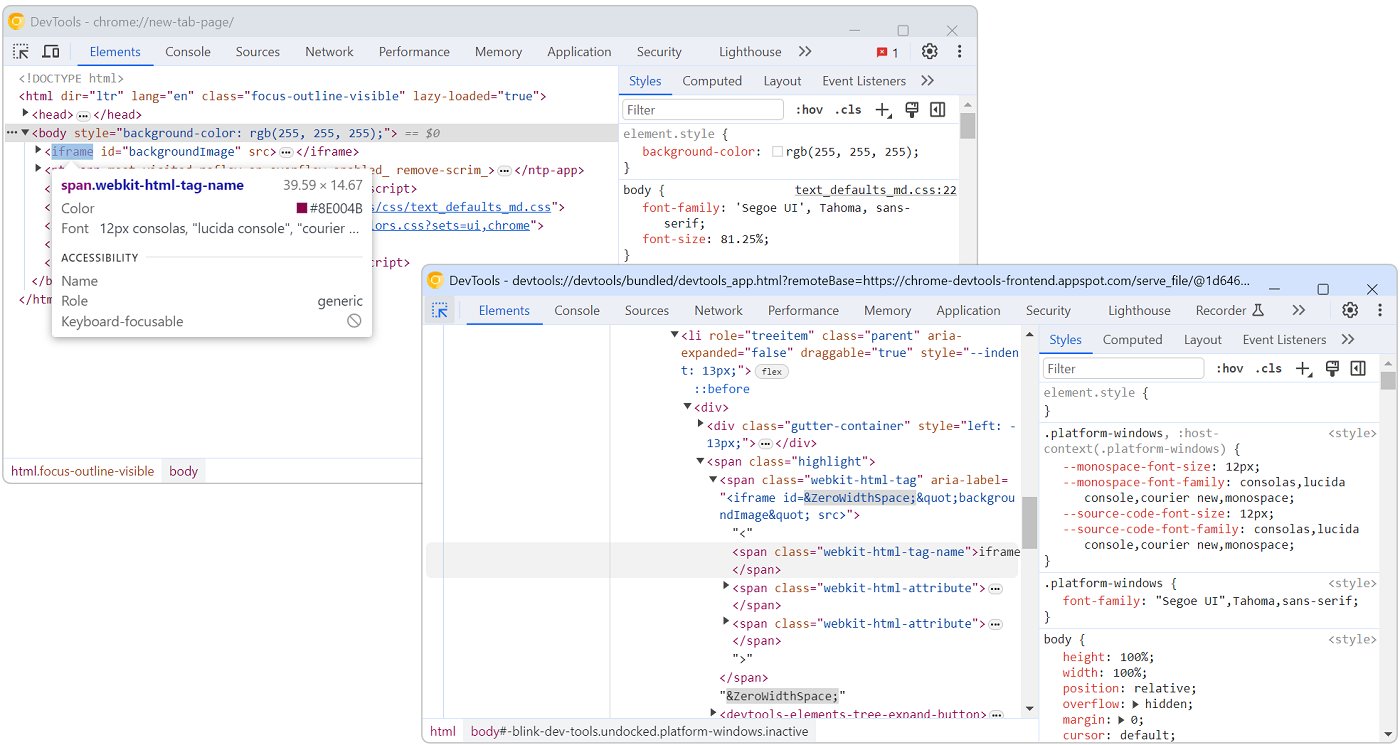
Inception of the DevTools 😵‍💫 You can inspect DevTools with DevTools. Yes, you heard right! A new DevTools window that inspects and debugs the first one. After all, the DevTools UI is all HTML, CSS, JS, so why not? Learn how ➡️ devtoolstips.org/tips/en/ins…
1
4
584
Tired of the default DevTools themes? Have a creative idea for a custom theme of your own 💡? You can load custom stylesheets in DevTools by creating a browser extension 🖌️ Learn more ➡️ devtoolstips.org/tips/en/cre…
4
3
683
I know, the Memory tool 💾 can look quite intimidating. But, hear me out! If you're looking for a memory leak, record 2 snapshots, and use the comparison feature. This helps focus on what changed only and filters out the noise! 🤫 ➡️ Learn more: devtoolstips.org/tips/en/fin…
1
3
4
586
The Console in DevTools can appear in its own tab, or at the bottom, below another tool you're already using. If you get confused by this and don't know how things really work, take a read at our latest tip: 🔗 devtoolstips.org/tips/en/und…
1
3
344
Want to know which font was used in a long list of fallback in a font-family? Firefox's got your back! It nicely underlines the font that was used in the Rules sidebar! Learn more about it, and the difference between defined and rendered fonts here devtoolstips.org/tips/en/see…
6
28
4,850
Need to debug your demo on CodePen, JSFiddle, or Glitch? Tired of having to find the right iframe? Did you know you could re-target DevTools to an iframe! Learn how 🔗 devtoolstips.org/tips/en/ins…
8
16
2,825
Hey console fans! What do you do when you have tons of objects to log? You use console.table! But there's more: you can customize the properties that get displayed! Simply pass an array of strings as the second argument to console.table. Learn more 🔗 devtoolstips.org/tips/en/cus…
3
4
460
📏📐 Measure arbitrary distances and dimensions in the page with this awesome Firefox DevTools feature ➡️ devtoolstips.org/tips/en/mea…
1
9
20
5,283
Working on a backend service can be tedious if you have to refresh the webpage that's calling it every time you make a change. ✨ With DevTools, you don't have to ✨ ▶️ Replay XHR: devtoolstips.org/tips/en/rep… ▶️ Edit and resend any request: devtoolstips.org/tips/en/edi…
3
5
416
Have you ever wondered «what font is that» ? Whether it's because you want to use the same font on your site, or because you're debugging a font problem, knowing which fonts are used to render a page can be useful! With DevTools you can 👍🏽 Find out more: devtoolstips.org/tips/en/lis…
1
1
265
🎉 There is now a “See also” section on each tip page at devtoolstips.org! Learning new things is now easier than ever.
1
284
Want to know how much image, JS, or CSS data is transferred on your site? The status bar of the Network tool gives this info. Even better, filter the list of requests to only images (or whatever you want) to see how much they amount to! Learn more ➡️ devtoolstips.org/tips/en/get…
3
1
364
Need to test your form fields validation? With Polypane, you can do it easily by auto-filling forms with dummy values! Learn more ➡️ devtoolstips.org/tips/en/for…

ALT Animation of a form being filled after selecting "autofill" in the context menu, followed by the form being emptied after choosing "Clear form" in the context menu.

1
4
430
Non-Safari browsers on iPhone use Safari's engine. You'd think this would make them work the same. But there are some differences. Sadly you can't debug non-Safari browsers on iPhone 🙁 Chrome and Edge let you at least see your console logs 😀 👉🏽 devtoolstips.org/tips/en/vie…
2
1
351
We’re on front-end.social too if you want to follow us there!
1
1
380
🆕 New performance tip, just in! Find your most expense CSS selectors thanks to Edge's Selector Stats feature. ➡️ devtoolstips.org/tips/en/fin…
6
33
The `console` namespace in JavaScript contains more than just the `log` function. Way more! To find out, type `console.log(console)` in the Console tool. So meta! Learn more: devtoolstips.org/tips/en/lis…
1
1
4
devtoolstips.org analytics over the past 12 months 📈 Thank you all! How can we make the site better for you?
1
2
Two amazing new tips today! ⌨️ Customize your keyboard shortcuts in @ChromeDevTools & @EdgeDevTools: devtoolstips.org/tips/en/cus… 📐 Make sense of the flexbox item sizing magic in @FirefoxDevTools: devtoolstips.org/tips/en/und…
4
6
Did you know that you can customize the DevTools UI with extensions? You can install existing extensions, and even create your own! Learn more ➡️ devtoolstips.org/tips/en/ext…
2
Is the text too small in DevTools 🧐 Don't worry, you can easily zoom 🔍 1. Click anywhere in DevTools (to move the focus there). 2. On the keyboard, hold Ctrl (or Cmd on mac) and press + to zoom in and - to zoom out. 3. Enjoy 😁 ➡️ devtoolstips.org/tips/en/zoo…
2
One of the most powerful 💪🏽 CSS debugging feature of DevTools is detecting inactive CSS. @FirefoxDevTools has had this for some time. Soon, Chromium-based browsers will do too 🥳 With Chrome/Edge 106, enable "Authoring hints" to detect inactive CSS! ➡️devtoolstips.org/tips/en/fin…
3
3
Getting your web animations just right can be time consuming ⏳ Thankfully, Chrome, Edge, and Firefox DevTools have cool animation tools to inspect, replay in slow-mo, and update your animations! ➡️ devtoolstips.org/tips/en/ins… Hats off to @pankajparashar for yet another cool tip!
3
5
You can copy unique CSS selectors for any element in the DOM 🪄 Learn how ➡️ devtoolstips.org/tips/en/cop… Thank you @pankajparashar for the tip!
2
1
A tiny, but cool productivity boost tip in DevTools (Chrome/Edge): 💫 Automatically generate and copy the `document.querySelector()` expression, with the right CSS selector for any node💫 ➡️ Right-click the node > Copy > Copy JS Path. ➡️ devtoolstips.org/tips/en/cop…
9
15
Great Firefox-only tip from @mmatuzo: cmd/ctrl+click any <label> `for` attribute to jump straight to the linked input! 🦘 A real HTML productivity tip. Firefox supports other types of linked attributes too. Find out more ➡️ devtoolstips.org/tips/en/jum…

ALT GIF animation showing the Firefox DevTools Inspector panel, the mouse clicks the for attribute of a label element and the selection jumps to the related input element

11
35
Awesome color contrast fixing tip! Thanks @argyleink for sharing this recently. Focus a color in the Styles panel. Use the inspect tool (ctrl+shift+C) and hover over the element to display the tooltip. Modify the color. Learn more ➡️ devtoolstips.org/tips/en/fix…

ALT GIF animation of the Elements panel in Microsoft Edge. User clicks on color value, then activates the inspect tool, then hovers over an element on the page, then uses the arrow keys to change the color. We see the element tooltip showing the background and text colors as well as the resulting contrast.

1
1
You can filter HTTP requests in the Network tool by methods (GET, POST, PUT, etc.) Just type `method:POST` in the filter to filter the list! ➡️ devtoolstips.org/tips/en/fil…
1
3
There's now a way to filter the tips that are unique to a given browser. Go to a browser page (like devtoolstips.org/browser/fir…) and click the "Only show tips unique to this browser" checkbox ✅
1
Sometimes elements end up outside of the viewport, and they're not easy to find. With Edge DevTools, you can use the 3D View tool to quickly spot them! Here's how ➡️ devtoolstips.org/tips/en/spo…
1
6
🌟 We've got 100 tips on devtoolstips.org 🌟 Thank you all who have contributed ideas and PRs to the site 💯💓 Have other ideas you want to share with our community? Drop us an issue here: github.com/captainbrosset/de…
1
3
Are you a VS @code user? Then you might be interested in learning that Edge DevTools comes with many of the VS Code color themes! This way you can match your web development tools! ➡️ devtoolstips.org/tips/en/cha…
2
Are you more of a keyboard user ⌨️? In the DOM tree of DevTools, select a node and press Enter to go into edit mode. You can then use tab/shift-tab to move between attributes and tag name. This will make editing the node a lot easier for you. devtoolstips.org/tips/en/edi…

ALT GIF animation of a part of the Inspector panel in Firefox, showing how pressing Enter on a focused element goes into edit mode and how Tab allows to navigate from field to field

3
4
You you can simulate other devices in DevTools📱💻 You don't have to use the ones available by default only! Learn how ➡️ devtoolstips.org/tips/en/add…
devtoolstips.org just got a bit of a re-design. 🎨 Nothing major, but the various tips listing pages should now be a lot easier to scan and use. We're almost at the 100 tips mark! What's your favorite trick with DevTools? Let us know! 👂🏾
5
14
document.designMode="on" 💖 one of the coolest and fastest way to prototype content changes in your web page! devtoolstips.org/tips/en/pro…

ALT GIF showing how applying designMode on a webpage from the DevTools console lets you change any of the text on the page, by just clicking on the text and typing.

5
14
Cascade layers are available in all major browsers now and are a tremendous help! You can even visualize and debug them in DevTools, across Safari, Firefox, Chrome, and Edge 🎉 DevTools feature parity for the win! Here's how ➡️ devtoolstips.org/tips/en/deb…
4
5
💡 Discover the Issues tool in Edge 💡 Powered by webhint.io, the tool automatically reports useful tips, warnings, errors about accessibility, perf, security, compatibility of your page! You can also filter compat issues by browser. ➡️ devtoolstips.org/tips/en/get…
2
1
You can simulate different types of color vision deficiencies in DevTools, and understand how some people might experience your website. This works in Firefox, Chrome, and Edge! Learn more ➡️ devtoolstips.org/tips/en/sim…
5
6
You know what? Flexbox debugging is coming to Safari WebInspector!! So happy for this update, learn more about it, and many other things, here: webkit.org/blog/12522/releas… Way to go @razvancaliman and team!
2
1
Did you know Firefox had a really cool JSON viewer? Just enter the URL to a JSON resource and see the formatted response with expand/collapse/search/copy/save features, and more! 💯💗🌟 More info ➡️ devtoolstips.org/tips/en/see… How much do you want other browsers to have this too?
3
Confused about the CSS grid-template-areas syntax? DevTools helps you debug your named areas by visualizing them in the page! Learn how to here: devtoolstips.org/tips/en/deb…
3
3
Learn how to use the Snippet panel to manipulate JSON with JavaScript and the copy() function to get it back into your text editor. Quick tutorial 👉🏿 devtoolstips.org/tips/en/man…
2
Low text color contrast can greatly impact people's experience of your website 🎨🔍 Thankfully, DevTools have a lot of tricks up their sleeves to help you detect contrast issues. This tip summarized most of them ➡️ devtoolstips.org/tips/en/det…
1
2
You can paste several CSS declarations all at once in the Styles/Rules pane of DevTools ⭐️ They’ll be handled properly. No need to enter them one by one by hand. Learn more ➡️ devtoolstips.org/tips/en/pas…

ALT Gif showing pasting multiple css declarations at once in the Firefox Rules panel.

3
You can very easily know which element has focus from DevTools, and track this over time automatically too! Set a live expression in the Console to `document.activeElement`. Learn how ➡️ devtoolstips.org/tips/en/tra…

ALT GIF animation showing a web page with focus going through different element, and the Edge Console panel with the live expression showing a preview of the focused element

2
5